Details

    • Type: Bug Bug
    • Status: Ready for QA Ready for QA (View Workflow)
    • Priority: Normal Normal
    • Resolution: Not Fixed
    • Affects Version/s: None
    • Fix Version/s: None
    • Component/s: SRD
    • Labels:
    • Customer:
      OMAN-Tel

      Description

      Review SRD API getFiberDesignParameters

      <soapenv:Envelope xmlns:soapenv="http://schemas.xmlsoap.org/soap/envelope/" xmlns:ser="http://server.internal.api.srd.nep.mobinets.com/">
      <soapenv:Header/>
      <soapenv:Body>
      <ser:getFiberDesignParameters>
      <!-Optional:->
      <requestId>499</requestId>
      <!-Optional:->
      <serviceName>1043811_FBB</serviceName>
      </ser:getFiberDesignParameters>
      </soapenv:Body>
      </soapenv:Envelope>

        Activity

        Hide
        Ayed Bada added a comment -

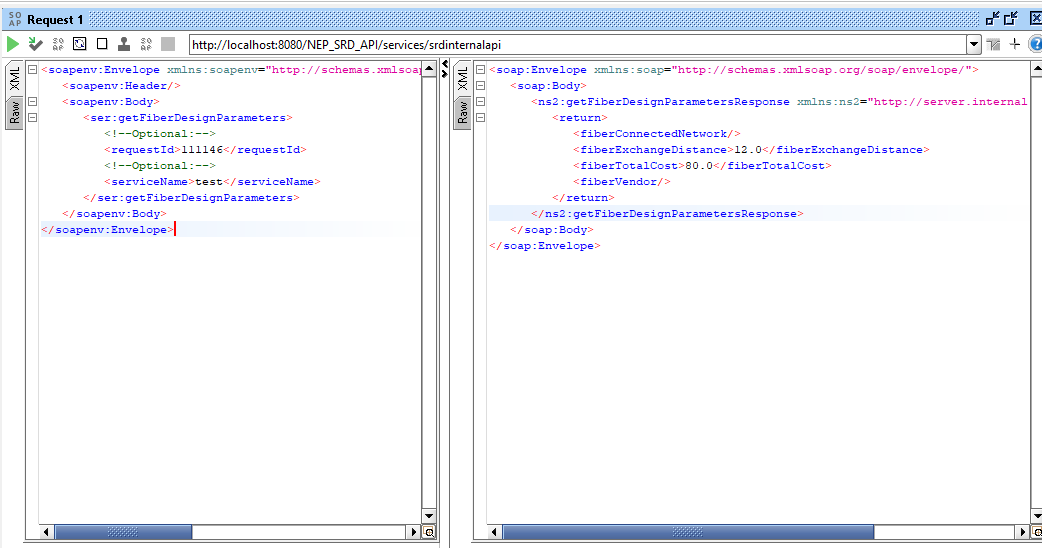
        The API is working correctly. In this example, it returns a default response.

        To get a real (non-default) response, please execute the following query:
        SELECT sm.request_id, sbi.MILESTONE_ID
        FROM SRD_MILESTONE sm
        INNER JOIN SRD_BOQ_ITEM sbi
        ON sm.id = sbi.MILESTONE_ID
        WHERE DTYPE = 'FIBER';
        This will provide a list of request_id values that can be used for testing and should return non-default data.

        Please also refer to the attached screenshot, where I tested this in my local environment.

        Show
        Ayed Bada added a comment - The API is working correctly. In this example, it returns a default response. To get a real (non-default) response, please execute the following query: SELECT sm.request_id, sbi.MILESTONE_ID FROM SRD_MILESTONE sm INNER JOIN SRD_BOQ_ITEM sbi ON sm.id = sbi.MILESTONE_ID WHERE DTYPE = 'FIBER'; This will provide a list of request_id values that can be used for testing and should return non-default data. Please also refer to the attached screenshot, where I tested this in my local environment.
        Hide
        Mbaye Lo added a comment -

        To be demoed in SRD §UI

        Show
        Mbaye Lo added a comment - To be demoed in SRD §UI
        Hide
        Zein Trabelsi added a comment -

        1) Find a request with an active FIBER task (status=BOQ_IN_PROGRESS). Run this to confirm:
        2) Then Fill Fiber BOQ in the UI
        Open request -> Fiber tab -> BOQ section -> add at least one BOQ item then save.
        3) Call the API

        <srd:getFiberDesignParameters>
        <requestId>...</requestId>
        <serviceName>empty</serviceName>
        </srd:getFiberDesignParameters>

        4) Show the customer

        UI (Fiber tab) API Response

        Show
        Zein Trabelsi added a comment - 1) Find a request with an active FIBER task (status=BOQ_IN_PROGRESS). Run this to confirm: 2) Then Fill Fiber BOQ in the UI Open request -> Fiber tab -> BOQ section -> add at least one BOQ item then save. 3) Call the API <srd:getFiberDesignParameters> <requestId>...</requestId> <serviceName>empty</serviceName> </srd:getFiberDesignParameters> 4) Show the customer UI (Fiber tab) API Response

          People

          • Assignee:
            Mbaye Lo
            Reporter:
            Mbaye Lo
            Rejected By:
            Ayed Bada
          • Votes:
            0 Vote for this issue
            Watchers:
            3 Start watching this issue

            Dates

            • Due:
              Created:
              Updated:
              Resolved:
              Planned Start:
              Planned End:

              Drag and Drop