Details

    • Customer:
      Airtel India

      Description

      Duplicate node IDs for MW nodes have been observed, specifically for UBR nodes (i.e., Cambium). As discussed with the customer, for operational reasons they do not want any changes in the existing ID/Object ID column. After analysis with the product team, we finalized that a new column, referred to as Object ID, needs to be created with unique values for NEP functioning.

      sharing one sample id from delhi circle for working..2401:4900:0:134:0:877:0:341, 2401:4900:0:134:0:877:0:342
      In this cases, same IPV6 IP are used for Cambium, Aviat & Ceragon nodes, & IP addresses are used as ID in XML in network element report
      so, links are available for both cambium & Aviat/Ceragon in XML due different link ID because interfaces are also used in link ID with concatenation.

      That is why this issue is coming, multiple links are available for different OEM with duplicate IP, whereas only one node is imported in network element report.

        Activity

        Hide
        Priyasha Tiwari added a comment - - edited

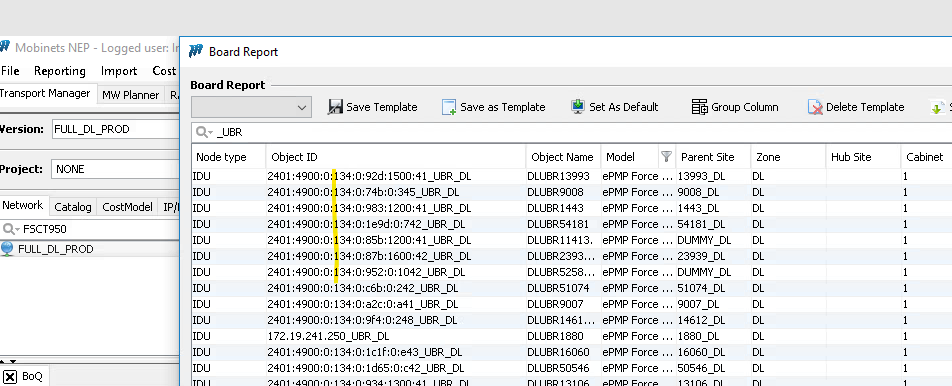
        board report the object id is not correct , should be same as the object id for UBR node report. refer the screenshot attached .

        Show
        Priyasha Tiwari added a comment - - edited board report the object id is not correct , should be same as the object id for UBR node report. refer the screenshot attached .
        Hide
        Khaled Khalil added a comment -

        Dear
        A separate ticket LS-683 is created for the last mentioned issue

        Show
        Khaled Khalil added a comment - Dear A separate ticket LS-683 is created for the last mentioned issue
        Hide
        Priyasha Tiwari added a comment -

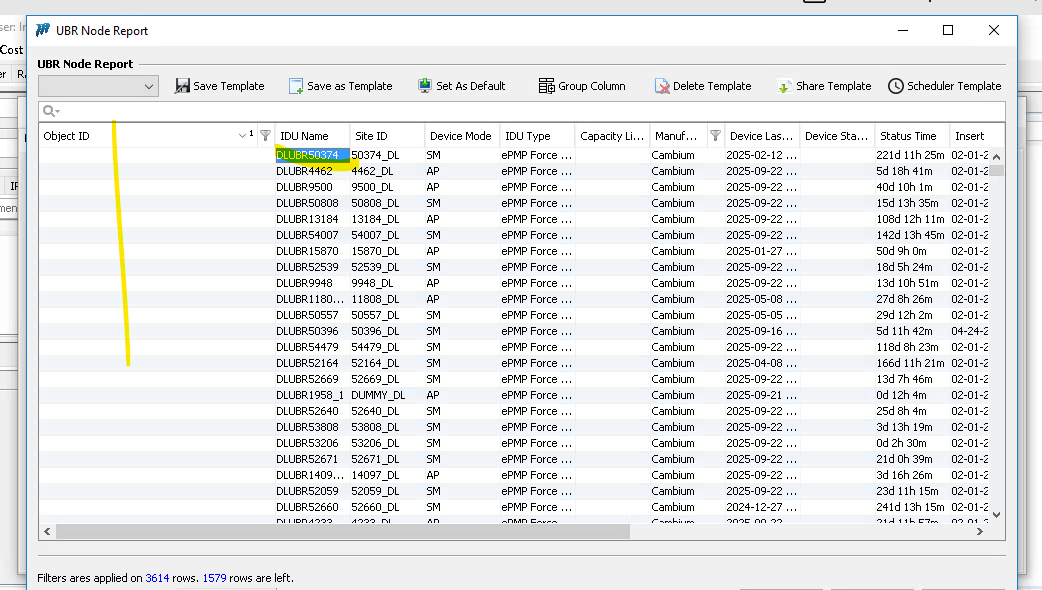
        some object id in ubr report for cambium is showing blank please check , snapshot attached for your reference .

        Show
        Priyasha Tiwari added a comment - some object id in ubr report for cambium is showing blank please check , snapshot attached for your reference .
        Hide
        added a comment -

        Hi Dear,
        Build 3.7.71.496 has been released with the following changes:
        1. In the UBR report, the column name NEID has been changed to Object ID, and the previous Object ID has been renamed to NEP Object ID.
        2. Removed the validation for NEID format.
        3. Updated references from Object ID to NEID in the TOPOLOGY_SITECOMPONENT DB view for UBR.

        Show
        added a comment - Hi Dear, Build 3.7.71.496 has been released with the following changes: 1. In the UBR report, the column name NEID has been changed to Object ID, and the previous Object ID has been renamed to NEP Object ID. 2. Removed the validation for NEID format. 3. Updated references from Object ID to NEID in the TOPOLOGY_SITECOMPONENT DB view for UBR.
        Hide
        Srishti Kashyap added a comment -

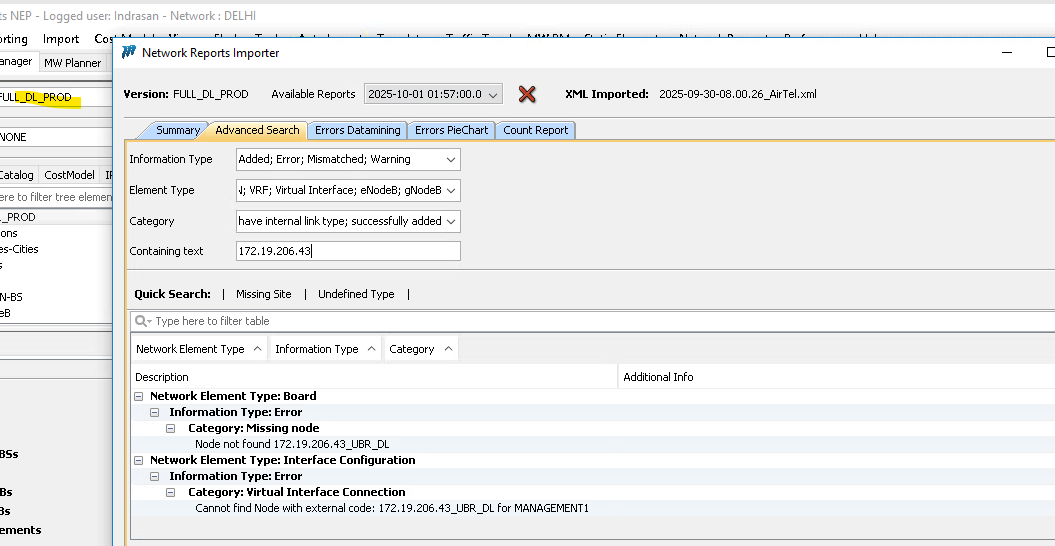
        column name changed facing below problem please suggest:
        During the XML import process, it has been observed that the NEID format is being validated against the expected format, which should contain a hyphen (“-”) as the separator.157-461007_10.19.137.46_RJ

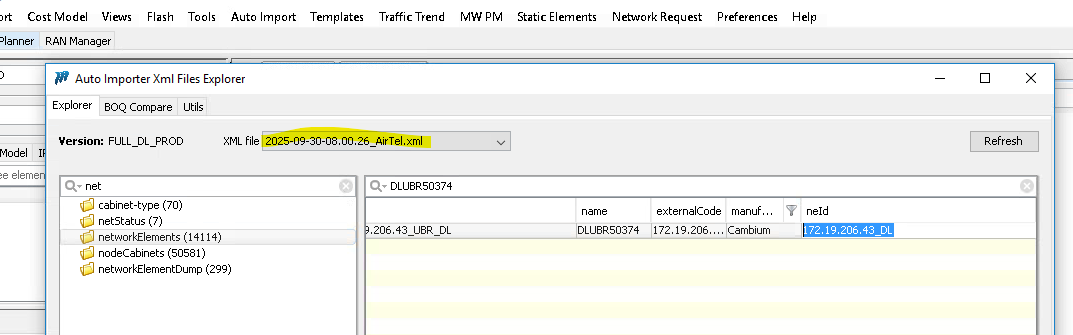
        However, in the current XML input, the NEID format for UBR is appearing as 10.186.4.90_DL, which does not follow the expected convention and therefore fails validation, preventing the data from being imported.

        Could you please suggest how we should handle this case? Should the XML be corrected at source to match the expected NEID format, or do we need to relax/update the validation logic on our side?

        Show
        Srishti Kashyap added a comment - column name changed facing below problem please suggest: During the XML import process, it has been observed that the NEID format is being validated against the expected format, which should contain a hyphen (“-”) as the separator.157-461007_10.19.137.46_RJ However, in the current XML input, the NEID format for UBR is appearing as 10.186.4.90_DL, which does not follow the expected convention and therefore fails validation, preventing the data from being imported. Could you please suggest how we should handle this case? Should the XML be corrected at source to match the expected NEID format, or do we need to relax/update the validation logic on our side?
        Hide
        Priyasha Tiwari added a comment - - edited

        As agreed we need to implement the below mentioned points.

        1- in the UBR report change the NEID column name to object ID, and the Object ID name it to NEP Object id ( NEP Part) –
        More Clarification
        New NEID column need to be added in UBR report name it as object id and data will be of ne id and node id column rename this as NEP object id and put in the last column.

        2- Ensure if any DB view is using this Object ID , to point to NE ID field as in DB the column remain the same ( NEP part)

        Show
        Priyasha Tiwari added a comment - - edited As agreed we need to implement the below mentioned points. 1- in the UBR report change the NEID column name to object ID, and the Object ID name it to NEP Object id ( NEP Part) – More Clarification New NEID column need to be added in UBR report name it as object id and data will be of ne id and node id column rename this as NEP object id and put in the last column. 2- Ensure if any DB view is using this Object ID , to point to NE ID field as in DB the column remain the same ( NEP part)

          People

          • Assignee:
            Srishti Kashyap
            Reporter:
            Priyasha Tiwari
          • Votes:
            0 Vote for this issue
            Watchers:
            3 Start watching this issue

            Dates

            • Due:
              Created:
              Updated:
              Resolved:
              Planned Start:
              Planned End:
              Actual Start:
              Date of Baselining:

              Time Tracking

              Estimated:
              Original Estimate - Not Specified
              Not Specified
              Remaining:
              Remaining Estimate - 0 minutes
              0m
              Logged:
              Time Spent - 2 days, 1 hour, 30 minutes
              2d 1h 30m

                Drag and Drop