Details

    • Type: Bug Bug
    • Status: Closed Closed (View Workflow)
    • Priority: Normal Normal
    • Resolution: Fixed
    • Component/s: SRD
    • Labels:
      None Labels
    • Customer:
      OMAN-Tel
    • Product:
      NEP

      Description

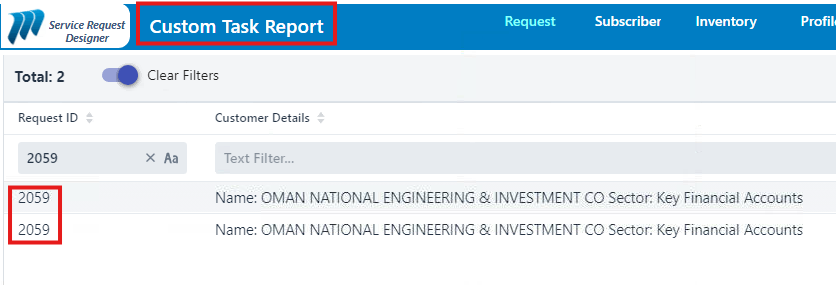
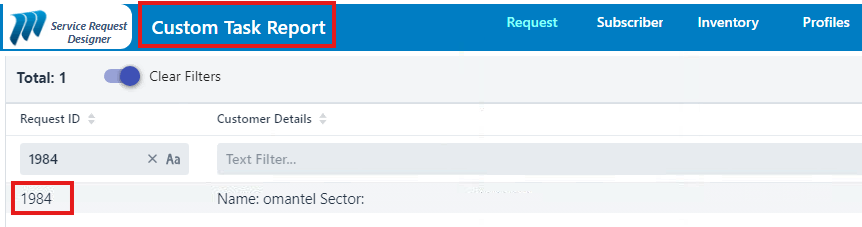
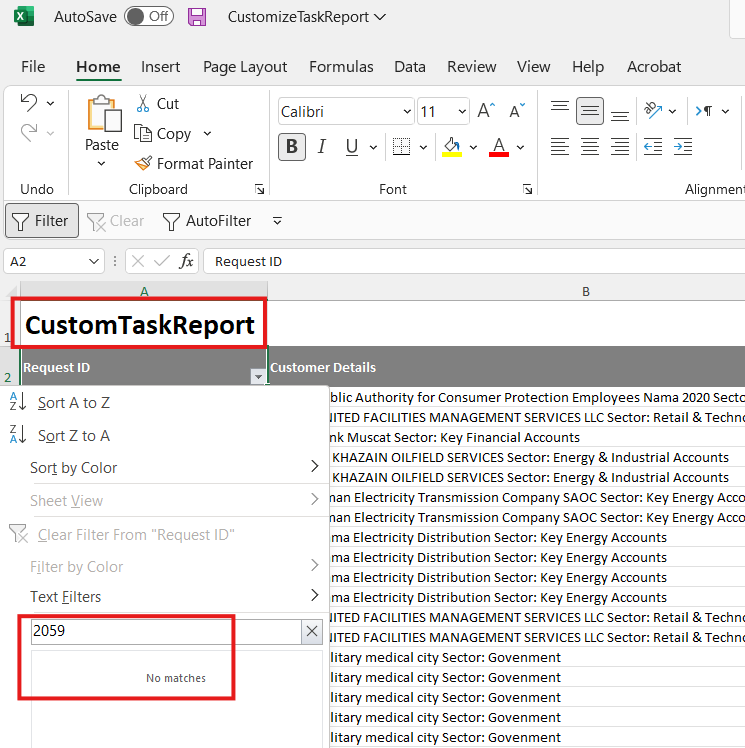
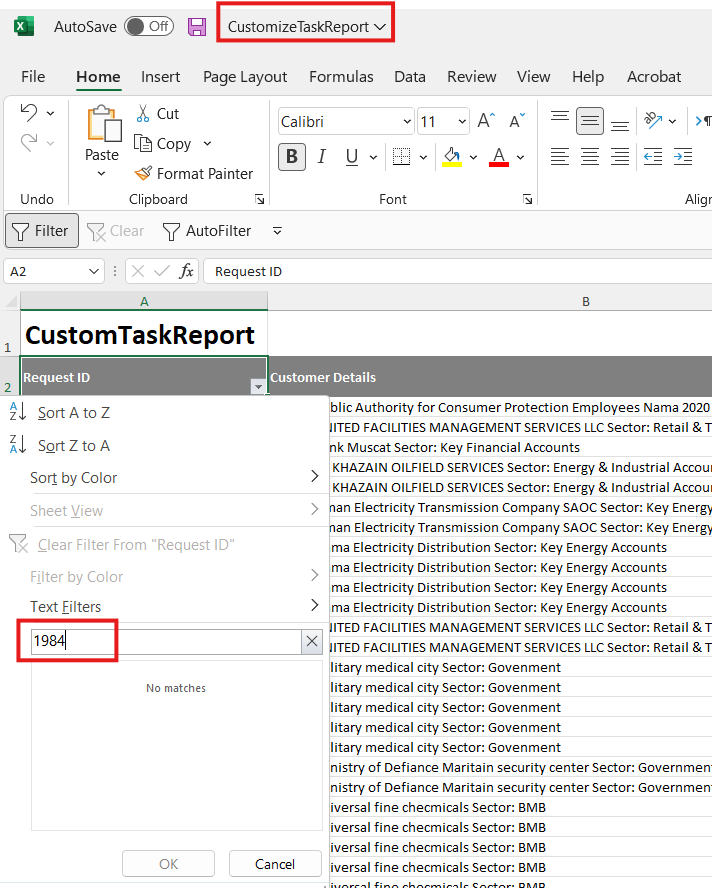
      We are facing an issue when exporting Custom task reports , some entries having Service Type as : “ Route Check “ and “New” aren’t being exported in the excel file while being visible on GUI.
      When exporting other report “Tasks Report” all tasks are being exported.

      1. p1.png
        51 kB
      2. p2.png
        21 kB
      3. p3.png
        57 kB
      4. p4.png
        65 kB

        Activity

        Hide
        Abdulrahman Dabboussi added a comment -

        The above screenshots are an example, entries of request IDs “ 2059 and 1984 “ are found on the GUI while when exporting the reports are left out

        Show
        Abdulrahman Dabboussi added a comment - The above screenshots are an example, entries of request IDs “ 2059 and 1984 “ are found on the GUI while when exporting the reports are left out
        Hide
        Ayed Bada added a comment -

        When exporting the Custom Task report, the generated Excel file only includes data from the last 30 days. As a result, the file contains 637 records, while the total number of records displayed in the GUI is 8,488.
        Therefore, request 2059 has a last task, SELECT_SOLUTION, with a creation date of 12:18 PM on 05/01/2026, and it does not appear in the exported report.

        Show
        Ayed Bada added a comment - When exporting the Custom Task report, the generated Excel file only includes data from the last 30 days. As a result, the file contains 637 records, while the total number of records displayed in the GUI is 8,488. Therefore, request 2059 has a last task, SELECT_SOLUTION, with a creation date of 12:18 PM on 05/01/2026, and it does not appear in the exported report.
        Hide
        Abdulrahman Dabboussi added a comment -

        Export button name should be changed to Export last 30 days to avoid confusion since it only exports last 30 days.

        Show
        Abdulrahman Dabboussi added a comment - Export button name should be changed to Export last 30 days to avoid confusion since it only exports last 30 days.
        Hide
        Ayed Bada added a comment -

        After discussing the Custom Task Report, I have implemented the required changes:

        I modified the button name from "Export as Excel" to "Export last 30 days".
        The data exported to Excel is now filtered by task creation date instead of request creation date.
        patch 3.7.0.1427.

        Show
        Ayed Bada added a comment - After discussing the Custom Task Report, I have implemented the required changes: I modified the button name from "Export as Excel" to "Export last 30 days". The data exported to Excel is now filtered by task creation date instead of request creation date. patch 3.7.0.1427.
        Hide
        Abir Messaikeh added a comment -

        Applied on PROD

        Show
        Abir Messaikeh added a comment - Applied on PROD

          People

          • Assignee:
            Abir Messaikeh
            Reporter:
            Abdulrahman Dabboussi
            Rejected By:
            Ayed Bada
          • Votes:
            0 Vote for this issue
            Watchers:
            3 Start watching this issue

            Dates

            • Due:
              Created:
              Updated:
              Resolved:
              Planned Start:
              Planned End:
              Actual Start:
              Date of Baselining:

              Time Tracking

              Estimated:
              Original Estimate - Not Specified
              Not Specified
              Remaining:
              Remaining Estimate - 0 minutes
              0m
              Logged:
              Time Spent - 1 day, 4 hours
              1d 4h

                Drag and Drop